

POS Loyalty Integration for Independent Shops: One Scan, One Order Record
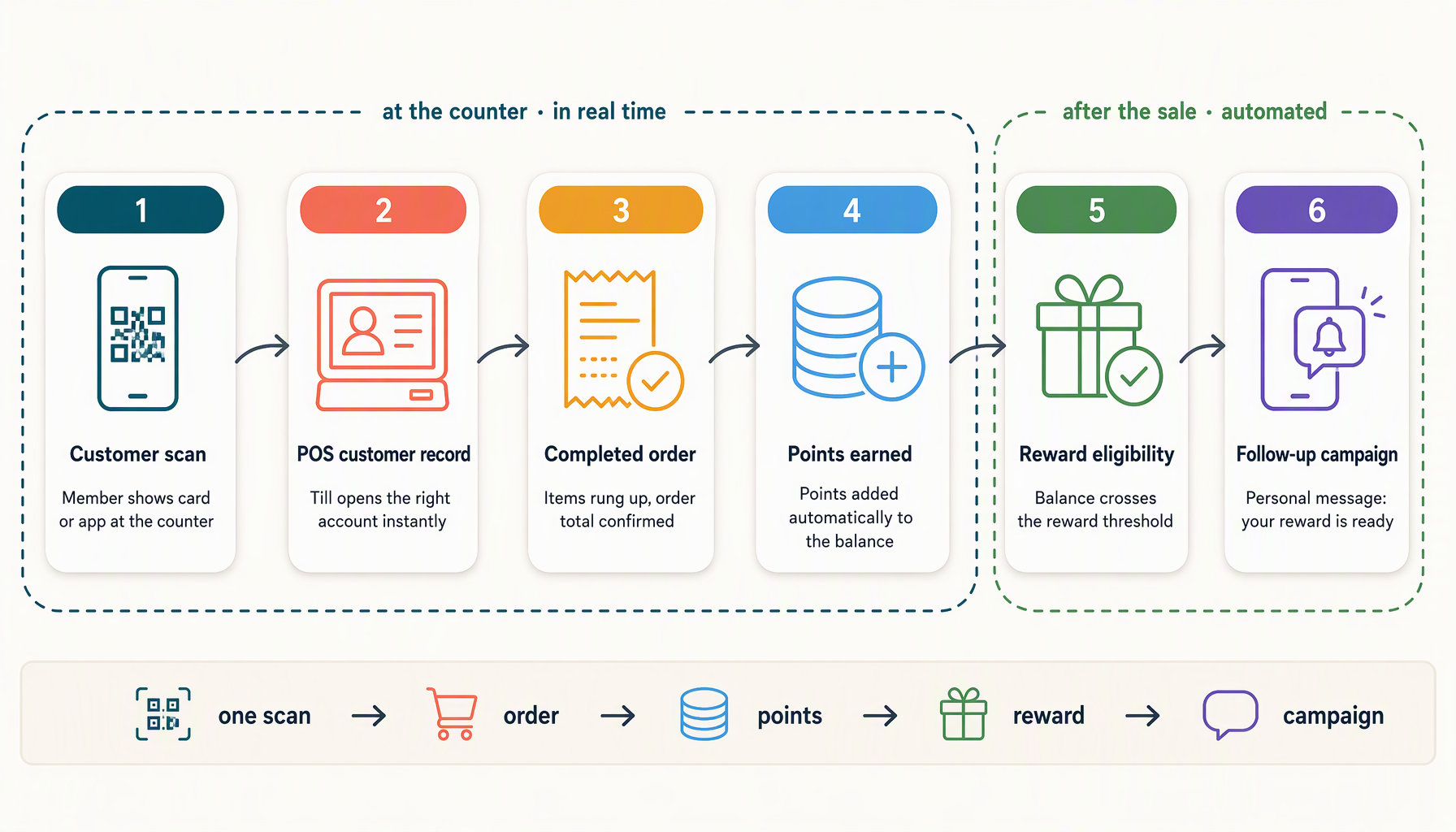
At a busy counter, staff do not want to enter a customer into two systems. The customer does not want to repeat their phone number while a line forms behind them. A useful POS loyalty setup lets the team identify the customer once, finish the order, and keep the loyalty record connected to what happened.
That is the promise behind a POS-connected engagement system. The important detail is the link between identity and the completed order. A successful connection screen or a customer directory is not enough. The integration must receive a customer identifier on the order, match it to the right loyalty member, and award the purchase once.
What the one-scan checkout flow should do
The target flow is short:
- The customer presents the QR code on their digital loyalty card or wallet pass.
- The POS or connected scanner identifies the customer record.
- Staff finish the order in the normal checkout flow.
- The POS sends the completed order and its customer identifier to Zea.
- Zea matches the identifier to a verified member link and applies the configured points or purchase rule.
The scan identifies the customer. The completed order supplies the purchase event. Keeping those roles separate prevents a customer from earning points merely by opening a pass, and it prevents a payment retry from awarding the same order twice.
The exact experience depends on the POS brand, edition, location setup, and scanner path. A merchant should test the live connection with a real but controlled transaction before describing it as automatic. If the POS does not return a customer identifier on the order, Zea should leave the sale unmatched rather than guessing from a name, email address, or nearby transaction.
Why one order record matters more than one payment
Some orders use more than one payment method. A customer may split a purchase between a card and cash, or a payment provider may send more than one event for the same order. The loyalty unit should remain the order.
If the integration awards once per payment, the customer can receive two or three awards for one purchase. A sound POS pipeline uses the provider order identifier as the anchor, stores the sale, and treats later notifications as replays or updates. It also needs a refund path so that returned goods can reverse the appropriate portion of the award.
This matters for the merchant's trust in the program. Staff should not have to investigate why a regular customer received duplicate points after a split payment. The owner should be able to trace an award to a POS order reference and see whether the order was completed, unmatched, refunded, or waiting for reconciliation.
Before enabling automatic earning, test these cases:
- one completed order with one customer;
- one order paid with multiple tenders;
- the same event delivered twice;
- a customer who has not joined the loyalty program;
- a partial refund and a full refund;
- a customer record from the wrong loyalty program.
The connection should produce a visible, explainable result for each case.
Turning order history into useful customer knowledge
An order can contain more than a total. Where the POS provider exposes line items, the connection may record the products, quantities, and order value associated with the purchase. That creates a foundation for practical personalization.
A café might notice that a member repeatedly buys iced drinks in the afternoon. A bakery might see that another member buys pastries on weekends. A small retailer may learn that a customer returns for a particular product category. These observations can inform the next message or offer, provided the shop has a lawful basis to use the data and the customer has agreed to the relevant communication.
Treat these observations as signals, not as sensitive labels. A single order does not prove a preference. Use repeated purchases over a reasonable period, give customers a clear way to opt out, and avoid inferring personal characteristics that the shop does not need.
The first campaign could be modest: invite afternoon iced-drink buyers to try a seasonal flavor, or tell customers who bought a qualifying item about a related reward. The campaign should state why the person is receiving it and avoid exposing the detailed purchase history that produced the audience.
Zea's broader engagement workflow gives the order a destination. Purchase activity can support points, reward progress, stamp activity, voucher eligibility, and audiences for follow-up. Social content can introduce the product or offer, while the POS-connected order records what happened in the shop. The owner can then decide whether to invite a second visit, ask for a referral, or leave the customer alone for a while.
Keep POS loyalty separate from the POS provider's own program
Many POS companies offer their own loyalty product. Running two systems that both award points on the same purchase creates confusion unless the merchant has made a clear decision about which ledger is authoritative.
Before connecting a POS, ask four questions:
- Which system owns the member balance?
- Which system applies the reward or voucher at checkout?
- Can the order carry a stable customer identifier that Zea can verify?
- What happens when the customer uses both programs or requests a refund?
Zea's POS capability model treats automatic earning as something to verify on the specific connection. A successful authorization or customer-list import does not prove that completed in-store orders can be linked to members. The first-sale test is part of the setup, not paperwork after the launch.
Use the order as the next engagement decision
After the purchase lands, choose one next action. A new member may receive progress toward a reward. Someone who claimed a voucher but did not use it may need a reminder. A frequent customer who has never referred anyone may be invited to share. A person who already received a campaign may need a quiet period.
The same customer identity can therefore support several experiences without forcing the shop to build separate lists for each one:
- the loyalty card holds points and reward progress;
- a stamp card records visits or qualifying actions;
- a voucher gives a defined offer with an expiry and redemption rule;
- a social post creates attention and sends customers to the offer or enrollment path;
- the POS order confirms the purchase event that moves the customer to the next stage.
The connection is valuable because it gives the shop a reliable event to act on. It does not remove the need to choose a sensible offer, respect contact permissions, or check the counter process.
Questions about POS loyalty integration
Does every POS connection support one-scan automatic earning?
No. It depends on whether the exact POS path can return a customer identifier on a completed order and whether that capability has been verified. A merchant should test a real transaction before promising automatic earning.
Can POS data reveal a customer's favorite products?
It can provide product-purchase signals when the provider shares item-level order data. Repeated purchases can inform an audience or message, but one purchase does not prove a preference and the available personalization depends on the live integration.
What happens when the customer is not identified?
The order should remain visible as unmatched and produce no loyalty award. Staff can invite the customer to join or use the standalone staff flow, but the system should not guess which member made the purchase.
What should I connect first?
Start with one location, one loyalty card, and one completed test order. Check the customer link, points or stamps, duplicate-event handling, and refund behavior before adding more campaigns.
If the POS path fits your shop, review Zea's engagement capabilities and the guide to choosing customer engagement software before expanding the workflow.